Downloads
First way:
If you already have Lineage2 Interlude (C6) client, just download our Play_L2Java.exe updater and save it to the clean L2 Interlude client folder.
IMPORTANT!
For the first time when Play_L2Java.exe is launched, press "Check files" (at the right & bottom corner) to ensure that all missing or corrupted files will be checked and downloaded again from our servers to ensure a good game! That's all, now you can skip the second way!
Second way:
If you don't have Lineage2 Interlude (C6) or just want to start playing here in an easy way, then please download our L2Java Full Client and extract it (already including everything that is needed.)
If you did everything correctly, your Lineage2 folder should look something like this:
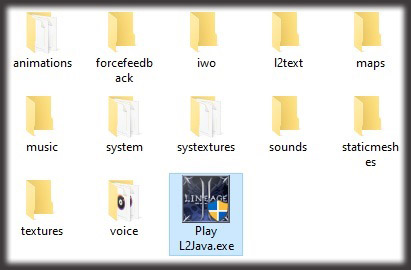
Now just press on Play L2Java.exe and enjoy!
OPTIONAL
By default we use Kamael (brown) Interface. For those who don't like it and want to use Interlude (blue) interface, just download this L2UI_CH3.rar file, extract it and paste it to the L2Java/systextures folder, that's all!
- P.S. The first time you run our updater, press "Check files" and it will test all client files and download all the missing or corrupted files. It may take some time, but don't worry, the next time it will run much quickly!
- P.S.S. If you have any problem in the future, just click "Check files". Our updater will check all needed files again!
- P.S.S. If you are getting a virus alert when downloading our patch, this is a fake alert (false positive). You can download only the updater and launch it to download everything!
Supported OS: Windows 7, Windows 8, Windows 8.1, Windows 10, Windows 11 (not ARM)
